Start with downloading things from Makerworld. You can find just about anything you want there.
Once you get a few files that you like you can load them into your favorite CAD program and see how they’re put together (if you’re not already a CAD wizard). If you’re already good with CAD do something that you designed!
Junk out of the chute is typically handled by one of your first prints; Makerworld has dozens (possibly hundreds) to fit every possible working environment and aesthetic preference.
You shouldn’t need to use the flash drive unless you’re not going to connect the printer to the network – if you are, and your computer is on the same network, they’ll talk to each other without much interference on your part (assuming you use Bambu Studio). The only thing I use the flash drive for is to store time-lapse videos of my prints.
Bambu Studio may look mildly intimidating, but generally speaking any file I download from Makerworld does not require any intervention on my part – I simply load it, pick my filament (because I have an AMS), “slice plate” (so it can create the gcode; this is also when it will tell you how long things are going to take, how much filament is being used, etc.) and then hit “print plate”.
Then I check the video feed from time to time until it tells me it’s done.
For your last question, you need a “poop chute”. Do a search on Makerworld for “Bambu poop chute” and you should find several that you can print. I can’t help you with a suggestion for a good one because I have a Snapmaker U1 that only produces a small percentage of the poop that other single head printers create. (I empty the poop basket it has only after a few months of frequent use.)
To download & use a model from Makerworld you find the model you want and then pick the big green download button. You can download a variety of formats including STL and 3MF. The STL is a basic design file (like an SVG or DXF for the Glowforge). The 3MF is an enhanced format that can include things like multi-color support (like the format GF uses in the GFUI that has the info on the separate steps and parameters).
Then open either the STL or 3MF file in the Bambu Studio app and proceed with slicing and printing. You can take the resulting sliced file and save it to a USB stick and run that from the printer console (depends on the printer model).
@hansepe - I haven’t used CAD since around 1994, and I had to learn just the basics when I worked at a gold mine!
@martin.anderson - I do have the printer and my computer hooked to the same network. And I just installed Bambu Studio. I also just found the tutorial, so I’m now reading through that. I have Makerworld, but wasn’t sure where the files go when I download them. Just wasn’t sure how it all tied together. But I’m gonna learn! (Who says you can’t teach an old dog new tricks? )
IMHO the best way to learn is to solve problems around the house with little custom designs. As you get comfortable with simpler things you’ll start imagining more complex solutions. Personally, I get little joy from printing somebody else’s design! (Unless I’m in a hurry and it’s the perfect thing.)
@timjedwards - I totally agree. I’m excited to learn, and will definitely start designing my own - as soon as I finish the tutorial! From the sounds of just the intro, it is supposed to help explain how to do so. And I do want have a little more confidence in doing so just from learning to design for GF, even though I know that is totally different than 3D. But at least my brain started to comprehend things.
@hansepe - thanks for letting me know where the files go!
I am so excited for you! You are going to have so much fun creating your own solutions and bringing your ideas to life!
Try not to touch the print bed with your fingers. The natural oils from your hands can cause the plastic to not adhere properly. If/when that happens, just remember to wash the build plate with hot water and dish soap. I think that is the most common issue beginners run into.
Thanks! I have been reading about the fingerprints. And I discovered that I didn’t get the gold flexible build plate, just the main black heat plate. I still tried not to touch it, but don’t want to print anything else until I get the gold one. I sent an email to customer support just before 11pm last night, and received a reply right before 5am! So I will be expecting the plate to come within just a few days. In the meantime, I’ll keep reading and learning.
I’m still confused on how to print. I downloaded a project for the discharge chute, but whether I look on the Bambu Handy on my phone, or Bambu Studio, I don’t see where to send it to the printer. But I’m sure I’ll be reading how.
Not totally! As you progress you’ll find that different print orientations can affect strength and quality, and your 2D to 3D Glowforge experiences will help you think through many problems.
I am loving my 3D printer! Besides the bed scraper, outer diameter measurement, and waste catcher, I was able to print a set of 12 tray stackers for my freeze dryer trays! It took me two hours, but saved me over $30 ordering another set online. I am thrilled! And there are so many more things I want to make.
I need to order some different colors of filament. I have Sunlu brand PLA red, black, white and blue I ordered off Amazon. I’m thinking for some of the stuff I need to make, which will be used outdoors, that I should use PETG instead. Is there any particular brand I should stay away from, in both PLA and PETG? I’m thinking I’ll order refills just so I don’t have a lot of extra spools laying around taking up space or throwing away, but really want to make sure I get good material. There are just too many brands to choose from. Help!!
Not sure about what to stay away from, but Sunlu, Polymake, Bambu and Ovation filaments all work well despite their different price points. I avoid any really cheap or no name stuff as these are reasonably priced, lots of variety and Amazon availability.
You can save money by getting refills (you’ll need to move them off the shipping spools into your saved plastic ones) and by buying in bulk - 10 packs seem like a lot until it’s not
I use ASA filament for outdoor use, and sometimes ABS. ASA is heat and UV resistant, which means it won’t melt or fade in sunlight. PLA and PETG are the easiest to work with, but may not be the right choice for outside applications. I mostly buy Bambu filament when it’s on sale, but have used pretty much every brand. Plastic is plastic, and as long as you keep it dry, you shouldn’t have issues. You can use your AMS if you got the pro version to heat and dry your filament, or you can use your enclosure and heated print bed to do that as well.
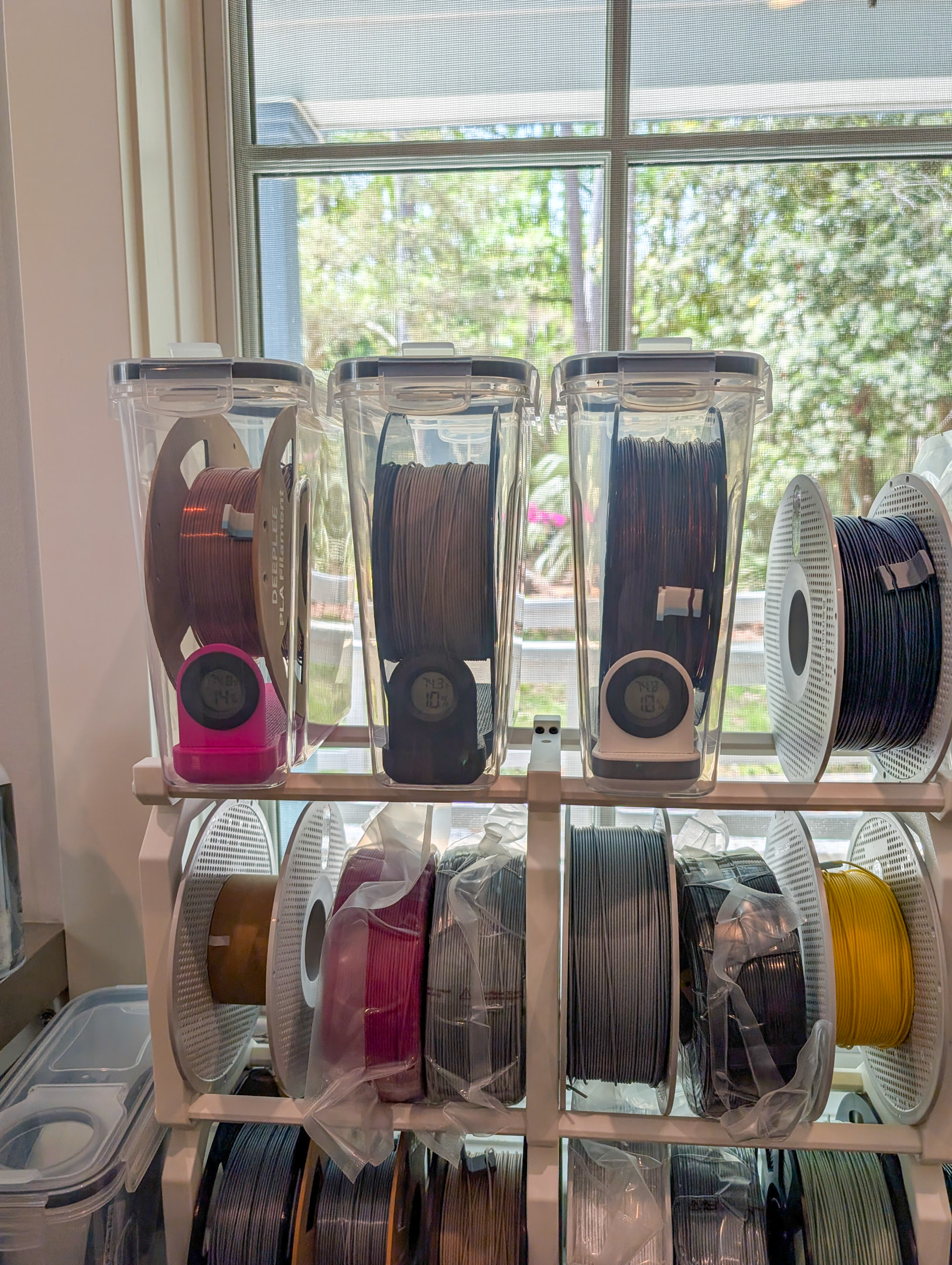
A cheap way to dry out your filament in between use is cereal drybox with desiccant beads. There are free files on makerworld to print that holds the beads and a humidity sensor.
Thanks @jamesdhatch and @pubultrastar. I appreciate your help. I do have the AMS so I know that’ll help keep filament dry. But I’ll definitely check on the cereal boxes.
Another question - have you printed your own spools for the refills? I’ve been looking at the different ones on Makerworld, but since I only have PLA right now, it seems that most don’t recommend it because it can warp during drying. But if I’m using the AMS, does that dry differently and not use heat as much? I have ordered a 4-pk of Sunlu PETG refills from Amazon because I thought I could just print my own spools. I’ll definitely keep ASA in mind for my outdoor stuff. I thought I could at least print a couple from PLA, but when I opened a couple of the files in Bambu Studio, it changed some settings, like the nozzle size to 4 (I thought my nozzle was only standard 2) and a few other things that I wasn’t sure about. It was easy enough to change it from what machine they had listed to PS2, but other than that I got all confused and removed the files. Have I said how excited I am to learn all this? But it’s also scary to me because I don’t want to mess things up. And I haven’t ready anything yet about changing nozzles, etc. I don’t even know if I have a different size or type of nozzle.
We went to a large swap meet (it’s a permanent one) on Sunday, and there was a guy selling some Creality 3d printers. He also has a large selection of filament he sells and is getting even more colors. His prices were pretty comparable for single spools on Amazon ($15) so I may get some from him when I’m in a pinch or want a particular color in a hurry. He told me he teaches this stuff full time, and was more than happy to show me how to use some of the settings, which he admitted might be slightly different because I have a Bambu and he uses Creality, but the 3D basics should be the same.
No, i’ve just accumulated enough spools along the way, as not all bambu filament is offered as a refill, so it comes with a spool. I just keep reusing them.
There are several designs for desiccant containers that fit inside the empty spaces of the AMS2. I am personally fond of a set that doesn’t require spools to be removed in order to get the containers in or out (so you can recharge the desiccant). I also quite like a design that fits into the core of filament spools; the more the merrier. Print them out of PETG or ASA as PLA will deform when heated to PETG temperatures.
…and speaking of desiccant, buy the orange colored variety. The blue kind contains cobalt, and is toxic (this is mainly a risk to kids/pets, but even so why bother when orange is easily available?). The orange type turns greenish when saturated, and can be trivially recharged by spending an hour or two in a 250F oven (err, in some kind of tray or something, don’t just toss your desiccant containers in the oven…)
 )
)


 And I haven’t ready anything yet about changing nozzles, etc. I don’t even know if I have a different size or type of nozzle.