I purchased it from Galactic Armory. I like to design my own stuff, but not armor (yet).
It printed on 3 different plates, totaling around 58 hours of print time. I increased the print time to get some better detailing in certain areas. It totaled around 973g of filament (so almost an entire roll)!
I added padding on the inside and cut out tinted face-shield for the eye holes. It gets warm and needs fans, but I am still playing with that. (I have printed 5 of this helmet.)
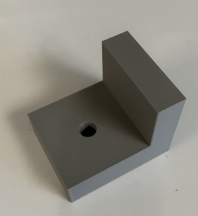
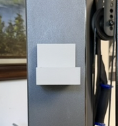
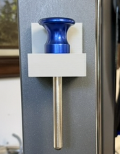
I am SO excited! I finally delved into learning to use Tinkercad and created something 3D! Whoop whoop! It simple, and not exactly how I wanted it (I wanted the base and back a little thinner, but couldn’t figure out how to fix that), but it’s something my husband has been wanting me to make to hold the pin for our weights on our exercise machine before I even got the 3D printer, and I was going to make it on the GF, but hadn’t gotten around to doing it. And it works!
(I don’t know why the 2nd and 3rd pics make it look white or light gray - it almost matches the machine!) The pin originally had a springy cord on it so you wouldn’t drop it, but it was a pain and made it hard to get the pin in the weights, so he cut it off. We’d been using a piece of folded-over duct tape attached to the machine (where the new holder now is), and after 1 1/2 years, it finally wore out and broke. We haven’t exercised in a couple months (shame on us!), but started again yesterday, and the need for the holder became necessary.
So last night I looked up free 3D programs because I couldn’t remember the name of what y’all recommended (and because I’m cheap!) and recognized Tinkercad. So I downloaded it and started playing around, going through the tutorials. This morning I got our little holder designed and was amazed how easy it was to send it to Bambu Studio! And it only took around 53 minutes to print. Like I said, I am SO excited! It feels good to learn new stuff at my age and actually have it work!
It’s such a nice feeling to take an idea into reality, especially a practical one!
The right tool is the one that gets the job done. I’ve never used Tinkercad, but if you eventually hit its limits you can try Fusion360, free for hobby use; it can output 3mf files for your Bambu printer. Parametric design is powerful!
I’ve heard you guys mention Fusion360 before, I’ll have to check it out. For some reason I thought it would be above my learning ability. Tinkercad seems pretty simple (although I couldn’t figure out how to make the sides thinner on the “L” I used), and seems really geared for teachers to use for students who can log into their classes, but it doesn’t export into 3mf files, just .STL and two others (I don’t remember what they are). So yeah, I’ll check out Fusion 360. Thanks!
Hmm…apparently it’s now called Autodesk Fusion. Tinkercad also says Autodesk.
Fusion is well within your abilities. This has been my daily driver for several years now and the great thing about it is you can start with just doing sketches and extruding them and then add other workflows as you need and get comfortable with them. Yes there are mesh and surface workflows but they are edge cases, you can do 99% of anything you want to do in solids and then dump the finished item directly into a slicer for 3d printing or dump into several other formats for use on the or CNC.
And here’s Louis Rossmann now personally taking on Bambu Labs. I stand by calling the changes scummy at best. I’ll leave it at that. *Louis is NYC through and through and will use language that reflects his heritage despite having moved to TX a few years back.
The Bambu open source discussion has been on my radar over the past couple weeks. Here’s Josef Prusa’s breakdown of what is happening. It’s the clearest explanation I’ve found.
The other piece of this Josef Prusa doesn’t cover there is that Bamboo Labs is threatening developers working with BL code that should be/is open source with legal action:


 or CNC.