I keep getting this error. I have cleaned it, unplugged it, refreshed and restarted my browser, tried another browser. I made sure the ribbon was attached to the head. It will print fine then do this for an hour. I am losing my mind.
Here is the error: An error occurred on your Glowforge. Please refresh your browser before printing. It may also help to turn your Glowforge off and then on again.
2 Likes
Did you clear the cache? Do that, then restart the browser. It might help.
11 Likes
I can be an issue with your art - the best way to test this is:
- Clear the cache on your browser
- Load the Gift of Good Measure
- Put cardboard into your machine
- Select the cardboard settings
- Hit go
Let us know what happens - and if it doesn’t work, let us know what failed specifically.
If it does work, then replace one thing. What you change depends on what you’re attempting to do right now that’s not working - if it’s odd material, try changing that. If it’s non-catalog art, try changing that - but only change one thing at a time and see what happens.
7 Likes
I did all the steps and printed on Glowforge light leather. the test file ran great so I added my own files. They all worked fine. I switched substrates to my own leather and tried to print the ruler. I got the error.
5 Likes
If there are lots of holes in the leather (from prior cuts) it sometimes can’t find what to focus on.
Try laying a piece of paper, or I use masking, over the center area and see if the problem goes away.
6 Likes
update, i put the glowforge approved leather back in and it worked. the issue is with using my own material. I do not understand why i have had an older model for years and always used my own leather. I tried the paper trick with no luck.
3 Likes
Is your leather really mottled, shiny, or extra thick maybe? I almost never use PG leather, and I’ve done mostly leatherwork during my time.
Willing to post a picture of your material?
7 Likes
I have tried several different leathers that are mine, mostly matte not very nothing crazy. the thing is i had another glowforge and i put all sorts of things in it all sorts of leather, thick thin whatever and it never gave me this issue. i did it for years and years.
4 Likes
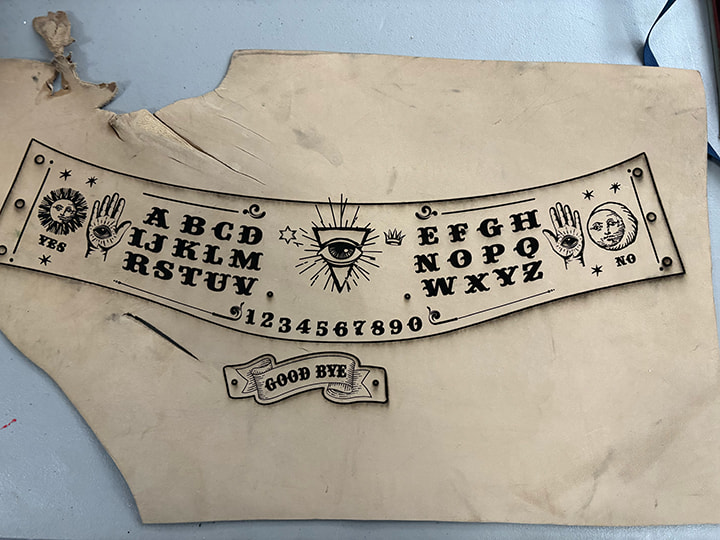
Here is the leather. I was able to laser it but I used another piece of the same color and I got the error
6 Likes
There no reason that shouldn’t work that I can see.
My next suggestion would be to mask it.
It also might be worth reaching out to Support. They might be able to see something in the logs that makes it make sense! You’ll likely have to jump through a number of hoops. Letting them know when you ran the GoGM and including that picture might speed it up.
7 Likes
That is a cool project BTW. And where can we see the finished piece???
Also, I have been getting the same error, so I am glad you asked about it.
4 Likes