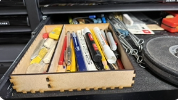
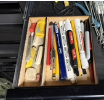
My husband asked if I could make him a wooden box to hold his pens in his tool chest. He’d been using an old checkbook box for many years, and it was falling apart, and gave me specific dimensions he wanted. So I thought I would try the new box maker in GF. It took less than a minute to generate and about 2-3 minutes to cut.
I messed up and put a side piece as the divider in the middle - wrong! So I modified it to fit by cutting off the side tabs, the whole time wondering why the tabs were offset. But by then I had tapped it in and couldn’t get it back out. and had to cut another one side. Duh! But I loved how easy it was, the kerf was just tight enough that I had to use my rubber mallet to gently nudge it together, but it’s as tight as anything. He was really happy with it, even with the inside divider not tabbed into the sides and only the bottom. So now I know that I’ll need to label the pieces myself (and ignore when cutting) so I know what is what. (sorry about the blurry pics - I can’t seem to get any of my photos to copy/insert correctly)