We have been using Glowforge machines for a little over 7 years now, and just today we lost our 29th printer (25 have been likely red wire burnouts, 3 were non-functioning on arrival and 1 was a physical problem with the lid hinges). The average lifespans of these machines for us has been approx. 6 months. 4 of our units were purchased brand new, the rest were refurbs swapped out by GF when the original units broke. We have paid the $1700 for refurb swaps 8 times. The remainder were warranty-covered swap outs. We use these machines frequently, they are business machines for us, but we take extremely good care of them. Just curious if any others have had as much bad luck with this company as we have. We’ve tried so hard to stay loyal to this company, but this is just getting to be so exhausting. Our only option now to stay with Glowforge will be to purchase yet another brand new machine with an extended warranty (it just doesn’t make sense to purchase a refurb with a 3 month warranty for 4 grand, knowing that it will die within 6 months), which will set us back another 9 grand. The company will not to offer any assistance of any kind with broken machine # 29, a refurb which they sent to replace a refurb, which they sent to replace a refurb. I worry also about what happens if we pay the 9 grand for a new machine, and the company folds. I don’t imagine they will be putting any kind of program in place to honor warranties, when it happens. Who else out there has had this many bad experiences?
You may well consider moving over to another platform. I, for one, moved over to xTool and have been more than satisfied with their laser products and support.
We’re in a sort of funny position; the reason we stay with Glowforge has everything to do with their software platform. We work exclusively with Hawaiian Koa wood sheets, which have a lot of wavy grain patterns and occlusions, so the ability to not only see the wood with the in bed camera, but also position and rotate individual svg files onto the image of the wood - rather than be limited to a single file at a time and only a simple perimeter outline to tell you where it’s going - is what keep us. If there were another laser machine that offered that specific feature, I’d be there in a heartbeat.
You have valid concerns – key to successful laser processing. Hopefully in the seven years of using Glowforges you’ve learned that the fish-eye camera skews its layout accuracy the further away from directly below the camera one’s artwork is placed. The xTool “close shot” camera is dead accurate for placing artwork, even to the point of moving your material after processing and then repositioning it for an additional score, engrave or cut. Virtually impossible with the Glowforge (unless one is using jigs). I think you may want to investigate the xTool P2S or P3.
No real trouble with the GF camera once you’ve run the calibration routine. Honestly, if it weren’t for the fact that we have to plan around these machines dying every 6 months, we would be very happy with GF. We use AP Lazer machines for all of our other lasering, they are great industrial machines with anopen bottom architecture and they are absolute workhorses. But for the Koa wood, the GF is perfect.
My meager well of advice has now run dry – good luck!
This is an excessive failure rate. Like you’re so far out of the norm here that I wonder if there’s something about your setup or how you use/maintain the machines that makes them fail more quickly than for other people.
I’m sure you’ve gone through it many times with support so I don’t have any answers for you but wow that’s a lot of failure.
I was thinking climate but we have many Hawaiian users so that doesn’t really explain it. Even so, it’s hard to imagine it not being operating environment on some fashion— I’m just not sure what else would take out your machines so quickly.
Yes, we’ve spent quite a bit of time troubleshooting that conundrum ourselves. We’ve got our machines hooked up to external filtration, with powerful fans pulling exhaust air out of the machines and through large HEPA filters. We use the machines for only one type of material; Koa wood. It’s not much different from any typical Proofgrade hardwood, though it does have a little more sticky tannin-resins that deposit over time. We keep our machines relatively clean, we only do 30 minutes max per operation, giving the machines a 10 minute cool down between operations, and we let the machines cool down for 10 minutes after last operation before powering them off. We’re on the “dry side” of our island, so no excessive moisture issues. The machines are of course indoors. The plain fact is, we use them for business, so they are often operating for multiple hours a day, several days a week. I will say that we have had, on average, longer lifespans with the newer machines, the ones where they started wrapping the HV red wire in sheathing, but this one we just lost was one of those, and it lasted only 6 months. So what should we be doing differently?
This is crazy to me. I’ve had my Glowforge since 2018, and I’ve only had to service it once. Granted, I probably don’t use it as often as you do if you use it for your professional business. And to be fair, mine does have its quirks (it doesn’t like taking a picture the first time you open and shut the lid, and it doesn’t always center itself the first time either).
But man, after 29 failures, I would move onto something else. There has to be something wrong with your environment to where those machines keep breaking. Humidity, temp, outlet, electrical input, etc.
Maybe something to do with the 60-80% humidity year round? Is there a way to get a Trotec laser in HI? They have lid cameras now, will process your material faster and more accurately, and last a decade or two. They cost more up front but probably less than you’ve spent replacing lasers.
When you say they have lid cameras, do they give you the ability to move individual vector files onto the Camera image and rotate/manipulate them the same way the GF app does? That’s the specific feature I’m looking for.
I have had lots of issues with mine and jumped ship and went to Aeon they have the best customer service and stand behind their products and support! I will never go back to a machine you have to rely on having to connect it to the cloud! I was excited when I got my GF and since it only came with a little warranty and no way to extend it the warranty ran out. I had my machine replaced 4 times in year with all the back and forth I probably actually got to use the machine maybe a total of 2 months in that year and kept getting refurbished machines as replacements. I really wish Glowforge would make it better they could really have a good thing they just need to listen to their customers! Provide service and offer an extended warranty!
We went from Glowforge (also had two within a year) to Trotec to Xtool (after the Trotec caught fire - not Trotec’s fault, to be clear). We love the Xtool and have no regrets going from the super high-end Trotec to the Xtool P3 - the P3 actually cuts better than the Trotec in our experience (we primarily cut 1/8” wood). It does have a camera and the ability to manipulate files on screen as you are working. Both Trotec and Xtool are very large and will probably require some reworking of your space, so that’s something to consider.
I think you’re the first person I’ve seen that got a p3. They look really nice, it seems to be just what I’ve wanted from Glowforge for years now — bigger, more powerful. If you’ve got the time to write up a review I’d love to see it. Maybe a new thread?
That’s really great to hear! Thank you for this information, I will look into their machines. Can you tell me a little more about the software program that enables you to manipulate individual files? I’d like to see if I can find a YT video tutorial. Do you happen to know if the Xtool PS3 runs on the same software platform as the model you have?
I’m not familiar with the PS3. Could you mean the P2S? That’s their desktop version. I’ve never used or seen it in person, so I can’t make a recommendation on it.
Xtool has their own software that I think all of their machines run off of. If I remember right, it’s fairly similar to what you can do with Glowforge - probably more powerful, but it’s been a long time since I’ve used Glowforge software, so it may have improved since those days. Xtool’s software is pretty intuitive after a few days of figuring out your settings, etc. You can build your files in the software if you choose, but I build in Illustrator and save out SVG files. Then, if I need to manipulate a file in the Xtool software (say, change a name that’s going to be engraved or move a piece of art around), I ungroup my art and can just move or change elements as needed. It’s similar to other vector art programs such as Illustrator, but Illustrator has more options and is what I’m used to working in, so I just keep using it.
So can you move/rotate/resize vector files on the real-time image of what’s in the bed? That’s the feature I’m most interested in, as we are cutting some very exotic wood sheets which often have small imperfections that have to be worked around.
Yes. If you go to the xtool website and just look at their feature video they clearly show it. It’ll take you five minutes to go look at the product page for the P3 and you will have all the answers you need.
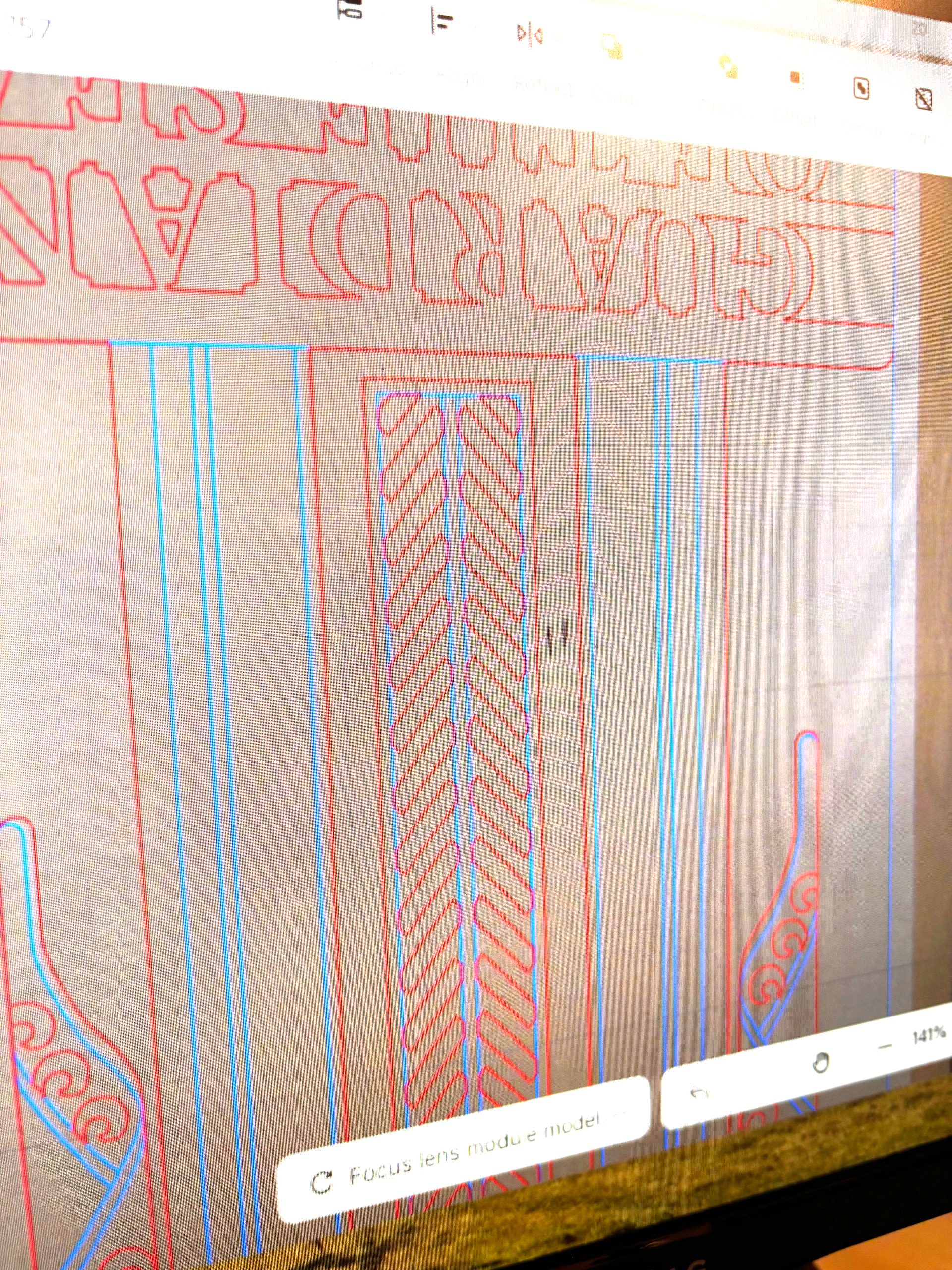
Yes! Here’s an example of something I cut this morning. This is a masked piece of cherry, which always has spots I try to avoid. I marked where the spots were on top of the mask, just so I could see them better. What you see here is a photo of the wood taken by the P3 with my art (blue and red) overlaid. So, I can make sure those marks fall in an area that will be cut away.
Have you looked into the GWEIKE Mcore desktop it is on kickstarter, check them out my be worth a look!