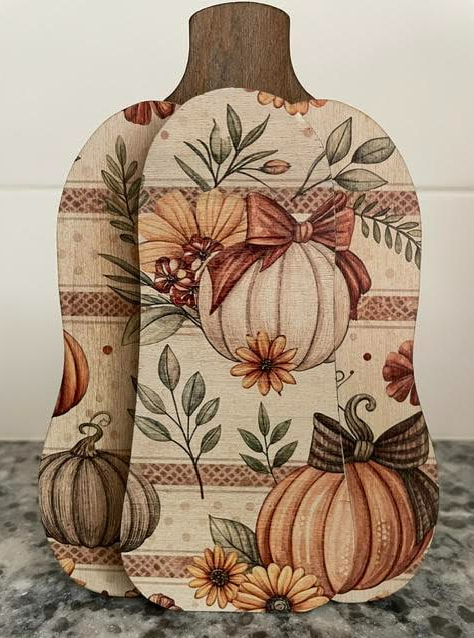
I am using the Build a Pumpkin Popout Card files from the catalog to make larger pumpkins to UV print. My problem is that enlarging the file also enlarges the skip in cutting that holds the piece into the backer board. I can still pop out the pieces despite the enlargement but it leaves behind areas that have to be sanded smooth and then redarkened to match the rest of the cut edges. Any suggestions on how I can convert this to a solid cutting line without the skip? I am including an example of one of the finished pumpkins.
It’s a little inelegant, but you could add small line segments using the premium tools.
Beyond that, it’s hard to recommend much. You can’t download catalog designs, so pulling them into an external editor isn’t really an option.
You could manually recreate the design or, if it’s sold elsewhere, contact the creator directly and ask for a modified version. Some designs are exclusive to the catalog, others aren’t.
Of course, you could also search the web for free pumpkin outlines that you can download and edit to your heart’s content. There are undoubtedly plenty to choose from.
Thank you for taking the time to reply. You confirmed my own conclusions so at least I don’t feel like I have overlooked something obvious. Unfortunately, my search of the internet hasn’t yet turned up anything similar that I like. I just need a simple 3 layer pumpkin so that it will stand on its own and is easy to print on. I will try contacting the designer to see if they have the file available elsewhere. Thanks again!
I reach out to the creator per your suggestion and she very kindly provided me with what I needed. Thanks again for your helpful response.
That’s great. it can seem daunting to learn vector editing, but it wouldn’t take much to get to the point where this kind of editing would be a quick project. The tricky part in this case is that you were working in the catalog and didn’t have the original source artwork.
If you do want to tackle that learning curve, there are lots of resources out there. I’d recommend Inkscape because it’s free, officially endorsed by Glowforge, widely used, and well-documented. If you are curious here’s a good starting point: