Does anyone with a glowforge know if you can fudge the height settings to do out of focus engraving? Im specifically thinking of it for rear engraving acrylic and colour filling.
2 Likes
Yes, I have. It works well for certain applications, especially to have a mottled surface of the engrave rather than seeing raster lines.
9 Likes
I thought @takitus had been playing with “out of focus” tweaks, but others just changed the material height setting to create “out of focus”.
EDIT: Dang it, @marmak3261 types faster than me 
4 Likes
Perfect thank you.
If anyone has done it on clear acrylic I would love to see that as well just to get an idea of how clear it gets. I have alot of that use in mind for the laser
A few of us have tinkered with clear engraving. Something you can look into is extruded vs cast acrylic. Apparently extruded stays clear when cut vs getting white/cloudy like cast acrylic. (I’ve only cut a little bit of extruded, haven’t engraved it though.) I think a few others here have more experience with the cast and they might speak up 
5 Likes
You can using the focus setting in manual mode! I’m moving it to Beyond the Manual where you can get more help with it.
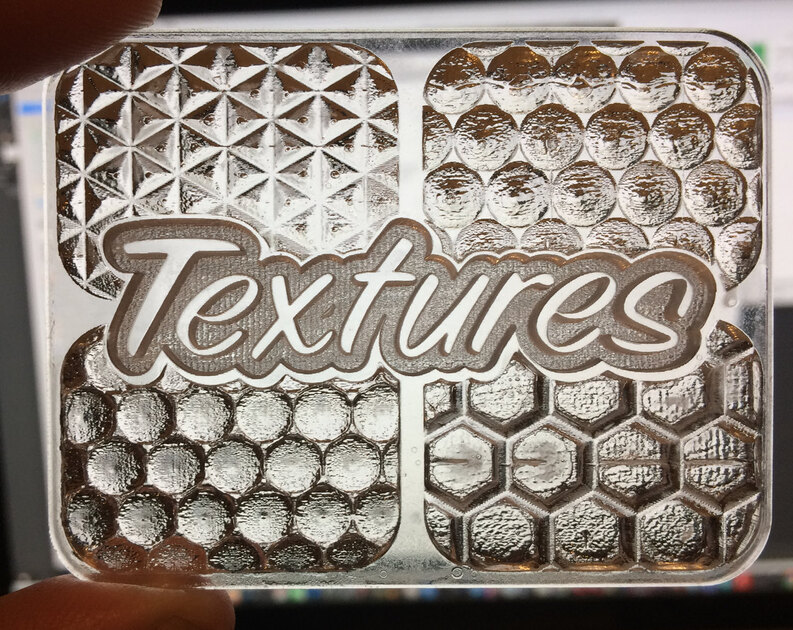
I’ve brought back a good amount of clarity in engraved acrylic by pouring acrylic weld solvent into the engraves and let it evaporate on its own.
This particular example was a fairly deep 3D engrave and I wasnt going for smooth finish from the laser, but tested the acrylic solvent bath and it did “polish” the frosted look pretty well.
I also tried 3D engraving some corner cube retroreflectors which turned out to be fails as far as reflectors go, but the texture is killer and the clarity after a few solvent baths is really good.
21 Likes
Thanks, the solvent bath is a good idea. Im hoping to paint fill with multiple colours between engraves though so solvent is a no go… But i’ll keep it in mind.
Mostly clear anyway. But it is more brittle than cast acrylic.
1 Like
Hey, so I want to start defocusing my engraves to speed up my engrave times. I get the general idea and I think I’m going to defocus so it is .25 above my material.
What should I do for my lines per inch? I usually engrave at 340 lines per inch? What should I bring it down to if I still want a fairly uniform engraves surface?